
Using LitBuy from a product link to a delivered parcel
The usual buying steps, with the free-day count marked at the point where it starts and the point where it stops.
Register and find the item
Create a LitBuy account with an email address, or sign in with Google or Discord. Register through our partner link if you want to support this site; the fees are the same either way.
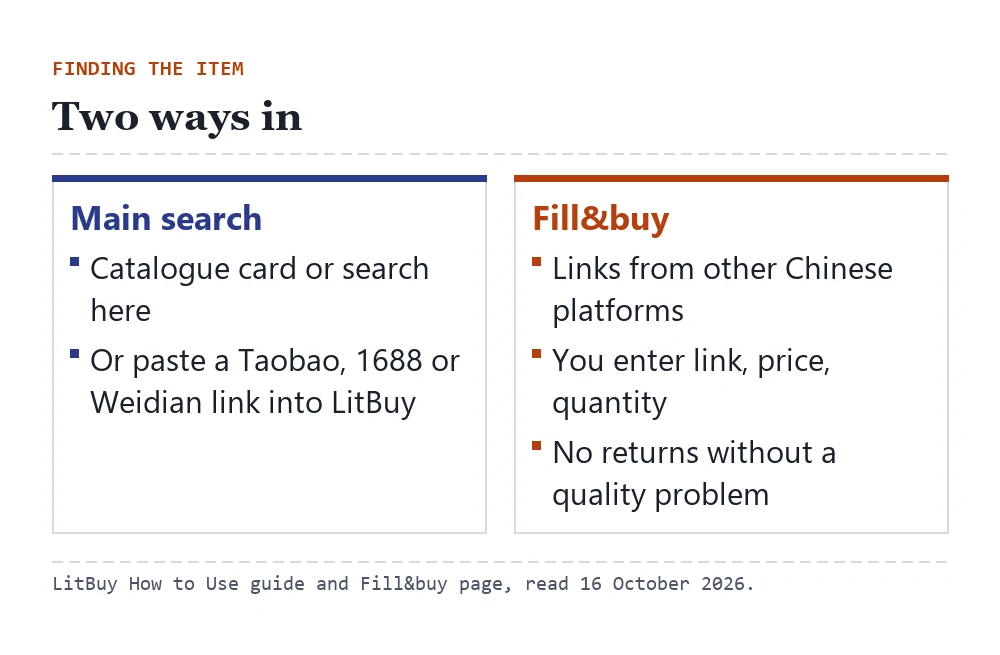
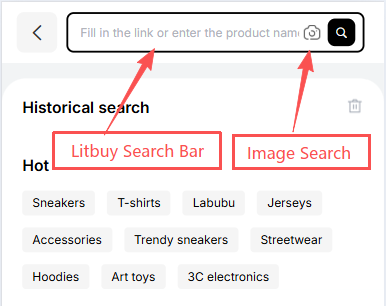
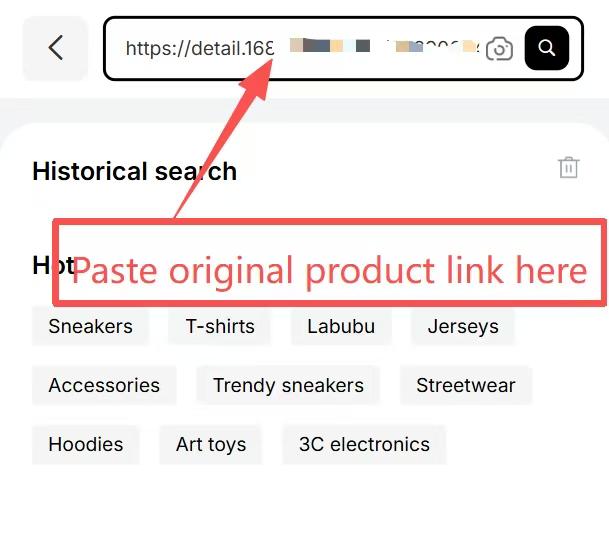
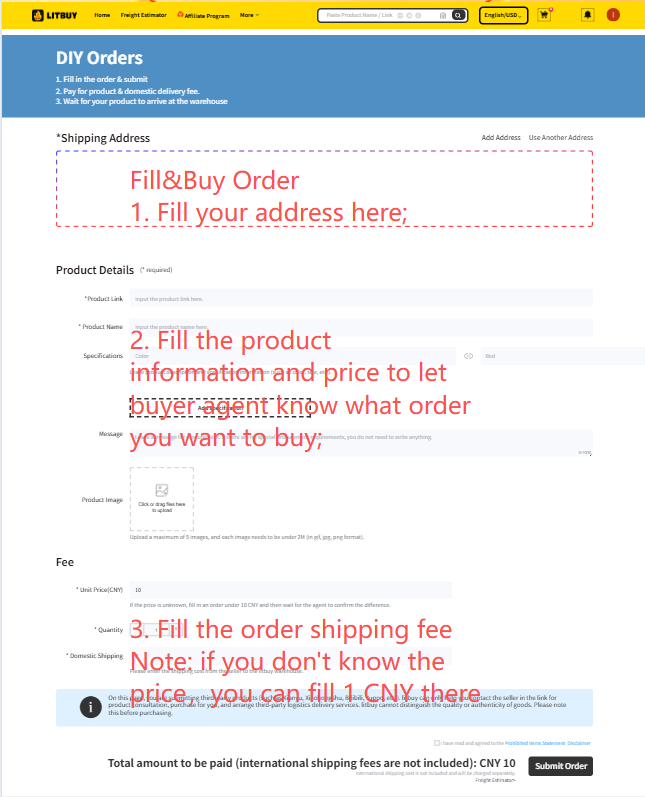
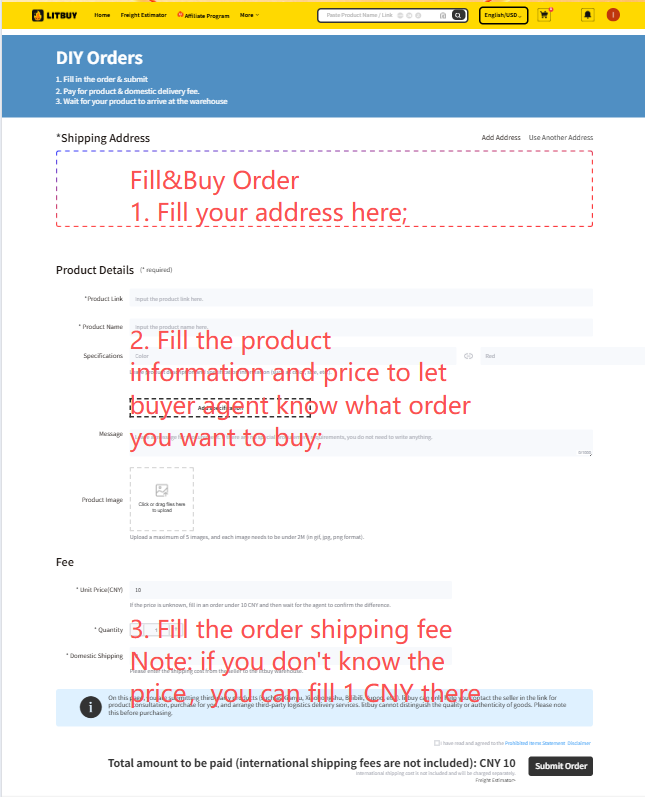
Find a product in the catalogue here, or paste a Taobao, 1688 or Weidian link into LitBuy's search bar. Links from other Chinese platforms can go through Fill&buy, a form where you enter the link, price and quantity yourself; LitBuy notes that Fill&buy orders do not support returns without a quality problem.
Before adding to cart, read the listing's size chart and the seller's notes. Put any size or colour instruction in the order remark, because the warehouse checks against what you wrote.
Pay and let the buyer order
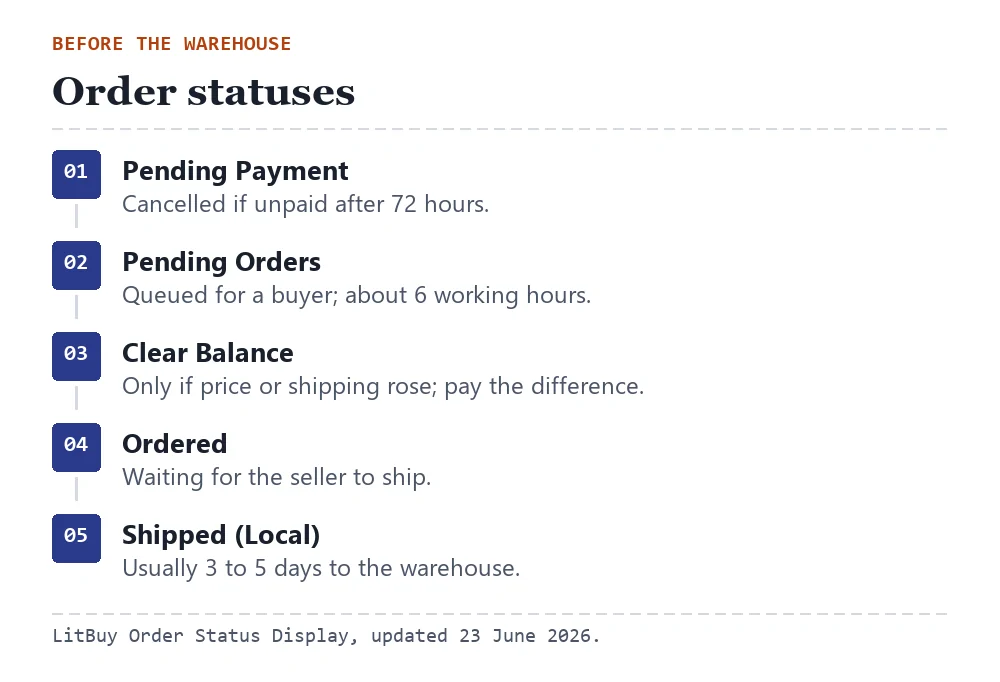
Unpaid orders are cancelled after 72 hours. Once paid, the order waits for a buyer, who purchases from the seller within about six working hours; purchasing runs 09:00 to 18:00, China time (UTC+8).
If the real price or the seller's shipping turns out higher than you paid, the order shows Clear Balance and waits for you to pay the difference. Answer quickly: the purchase pauses until you do.
The seller then ships to LitBuy's warehouse in Xiamen. LitBuy's status page says this normally takes three to five days.
Arrival, inspection and the Stored status
On arrival the order shows Arrived, then Stored once staff have opened the parcel for prohibited items, checked the goods, weighed them, swapped the seller's box for a LitBuy sealed bag where suitable and shelved them. LitBuy says this is done within 24 hours.
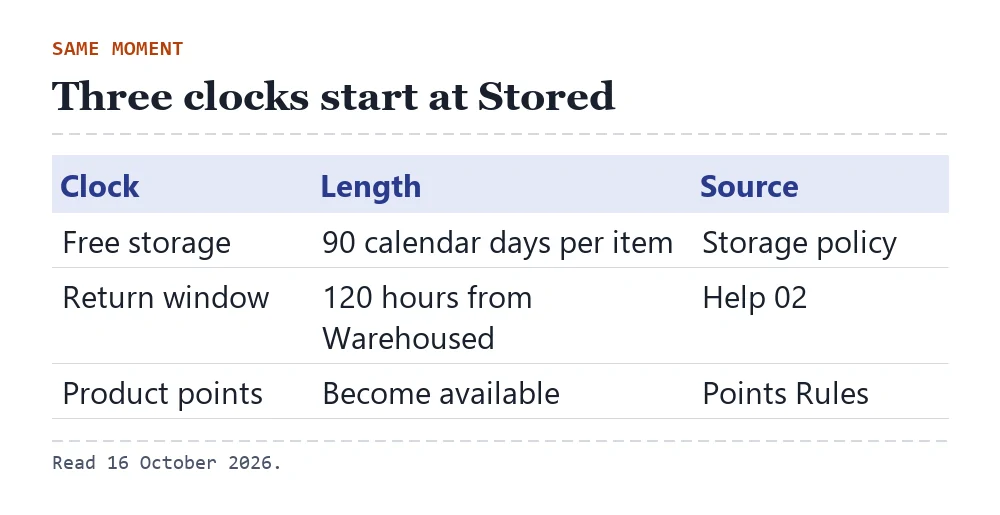
Stored is the moment your 90 free days begin, counted per K-numbered item from the date it is stocked and listed. Product points become available at the same moment.
This is also when the 5-day return window starts: 120 hours from Warehoused, counted from the next full hour, for returns the seller agrees to.
What the inspection photos cover
Routine inspection photos are free: usually 3 to 6 ordinary-resolution shots of the front, back and side or logo. Custom photos from angles you choose are charged at 1 yuan each, as LitBuy's help page puts it.
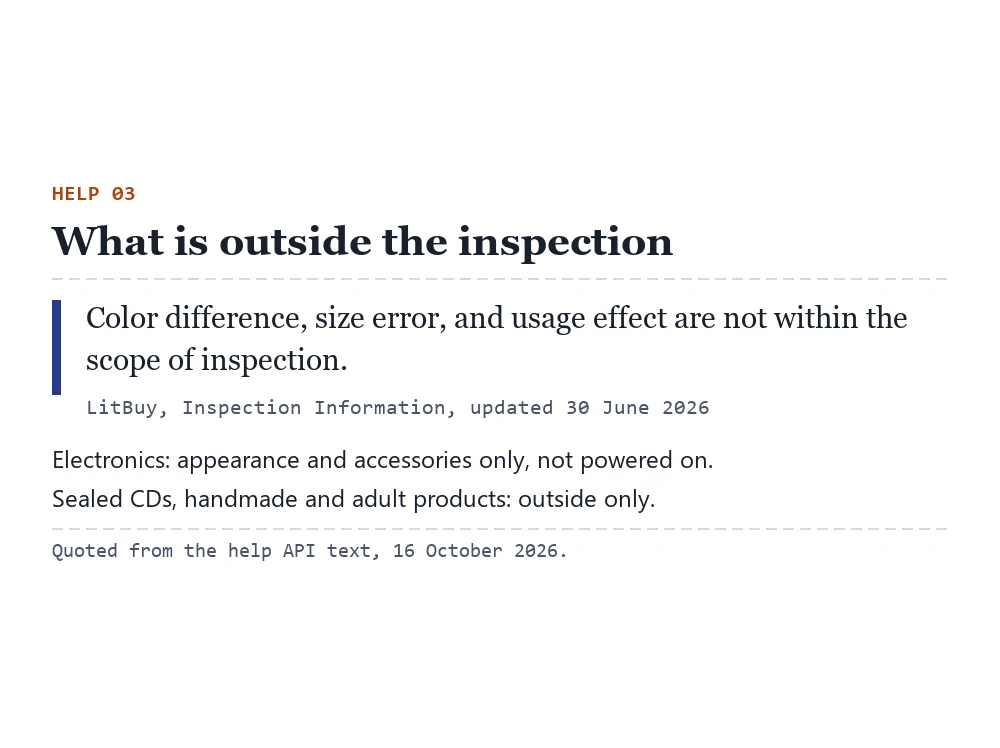
The check covers quantity, colour, size and other listed specifications, and visible damage. It does not cover colour differences, small measurement errors or how the product performs. Electronics are checked only for intact appearance and complete accessories; they are not powered on. Sealed CDs, handmade goods and adult products are inspected from the outside only.
LitBuy forbids counterfeit and IP-infringing goods and reserves the right to cancel such orders, close the accounts involved and dispose of that stock. The same company also says it has no way to confirm that a product is genuine.
Check QC while a return is still possible
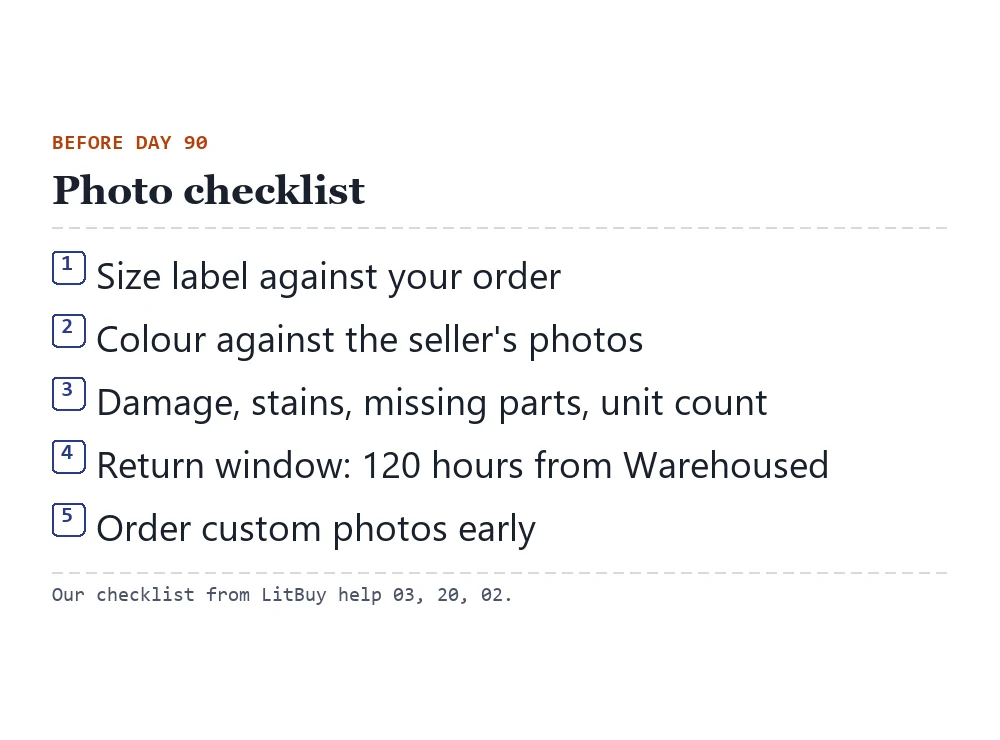
Here is how to check the QC photos LitBuy sends, in the order that saves the most time:
- Compare the label or tag with the size you ordered. The photo of the size label is the quickest check.
- Hold the colour against the seller's own photos, remembering that colour cast is outside the inspection.
- Look for visible damage, stains and missing parts in each photo, and count the units.
- If something is wrong, raise it while the return window is open: 120 hours from Warehoused. After that, a return depends on the seller.
- If you need more detail, order custom photos straight away. Waiting for them still uses free days, and the free days are what you are spending.
Example: the first item arrives while the second is still pending
Inspect the first arrival immediately. Compare its label, count, measurements and visible condition with the saved order; request a specific close-up if something important is unclear. Do not postpone that check until the rest of the haul arrives. The seller-agreed return window is separate from the period during which the item can remain in storage.
If the first item is acceptable, decide whether waiting is useful. Check the second seller’s actual progress, the first item’s storage deadline and the cost of separate versus combined shipping. QC photos do not certify authenticity or every function, so resolve any essential uncertainty before packing. Keep the item reference and the relevant photos with your decision rather than relying on a generic approval in a chat.
Submit a parcel and choose a route
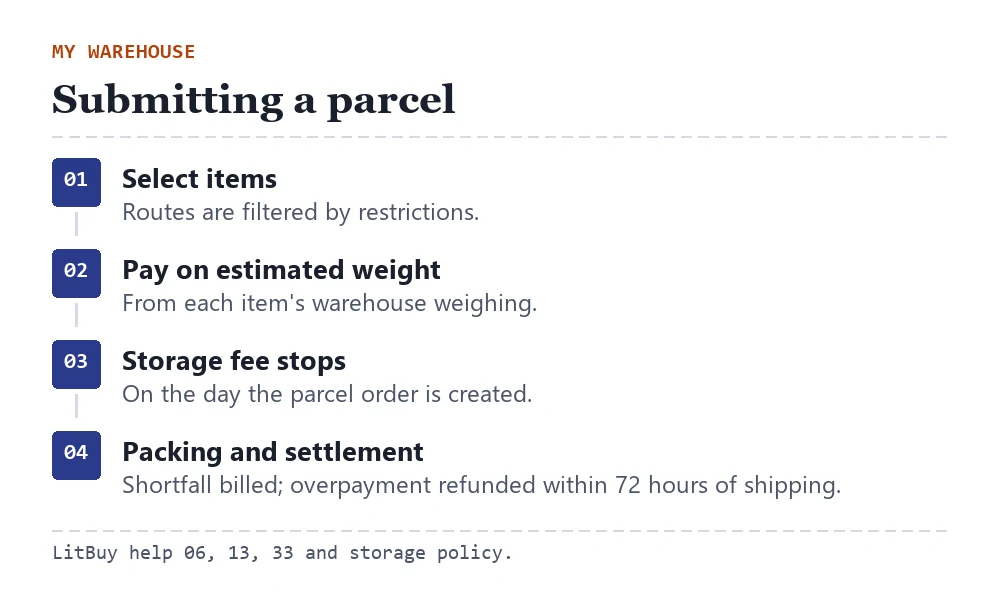
In My Warehouse, select the items to send and submit a parcel. The system filters routes by the items' shipping restrictions, shows an estimated weight from each item's warehouse weighing, and charges shipping on that estimate.
This is the step that stops the storage fee: calculation ends on the day the parcel order is created. After packing, the real chargeable weight is settled; any shortfall is billed and larger overpayments are refunded to your wallet within 72 hours of shipping.
Routes differ in price, transit time, size limits and how volume weight is calculated. Compare them for your own destination in LitBuy's freight estimator; this site does not rank them.
Delivery windows, customs and tracking
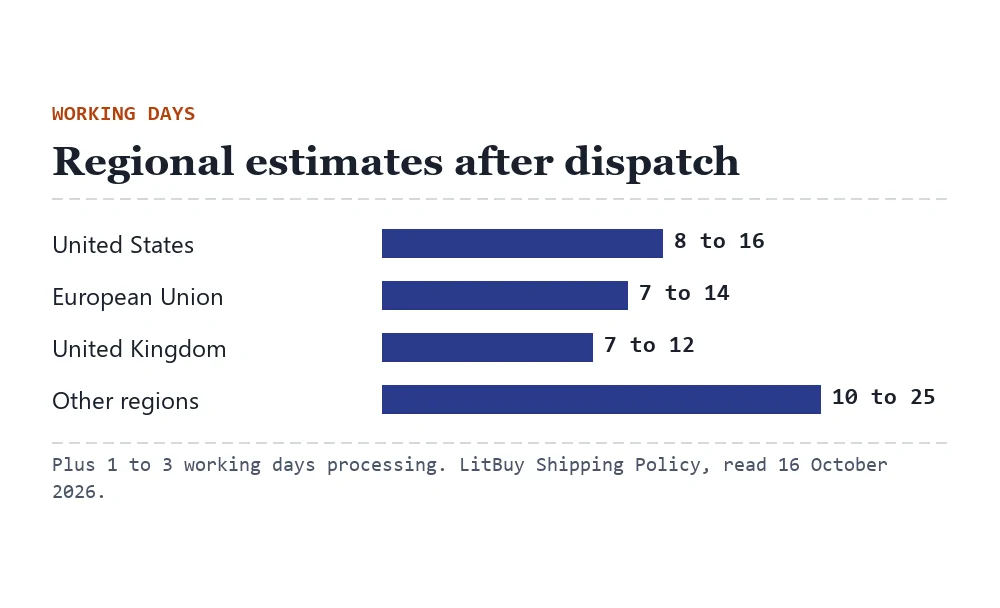
LitBuy's Shipping Policy gives region estimates counted from dispatch: processing takes one to three working days, then about 8 to 16 working days to the US, 7 to 14 to the EU, 7 to 12 to the UK and 10 to 25 elsewhere. Tracking may take up to 48 hours to appear.
Customs duties and taxes depend on your country and the route. On routes marked tax free LitBuy handles clearance charges; on others they fall on the recipient. LitBuy's help warns that customs risks such as returns or fines are borne by the buyer.
For damage or missing contents, LitBuy’s post-delivery article asks for a local carrier claim within 48 hours after tracking shows Delivered. Submit the LitBuy request within 7 days starting the next day. Keep photos, packaging and the carrier case number; do not wait for the carrier to finish before contacting LitBuy. No-update/loss and insurance pages have separate deadlines.
Next receipt in this set: Choosing sites, sellers and agents
The official buying screens, in order
LitBuy’s tutorial retained on 16 October 2026. These are older interface examples, not current price or availability quotes. Expand the stage you need; every image links to its original size.
1. Find an item
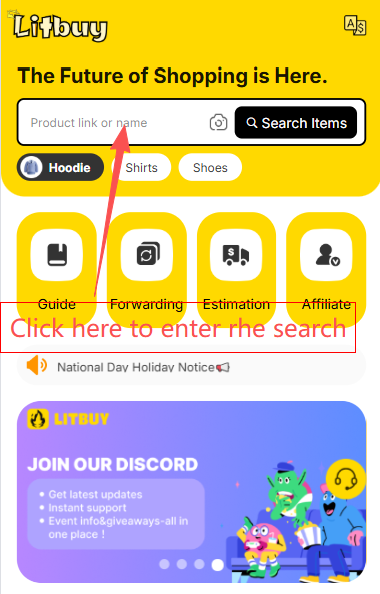
Search by product name, seller link or image. The catalogue helps you discover a listing; check the original seller page before ordering.
2. Create the order
Paste a supported seller link. Use Fill&Buy for a supported listing that cannot be read directly, and confirm the final price. The official article repeats the Fill&Buy screen in images 4 and 5; it is not an extra order step.
3. Choose, confirm and pay
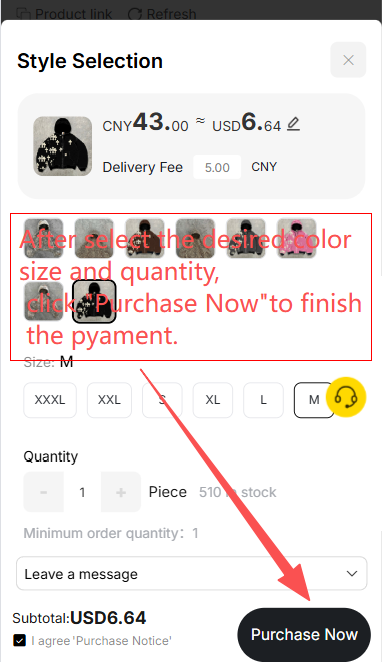
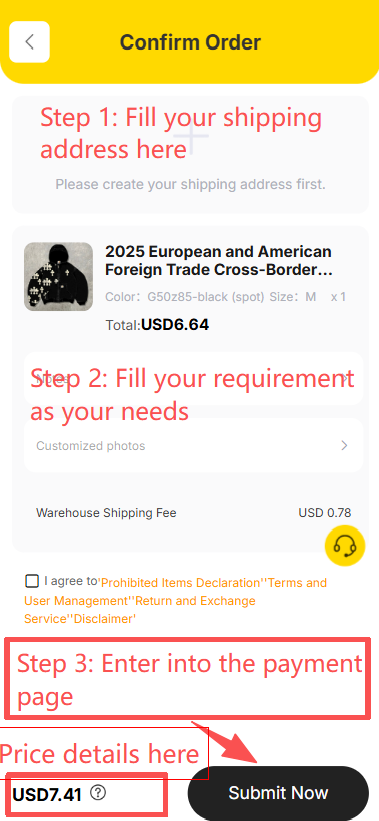
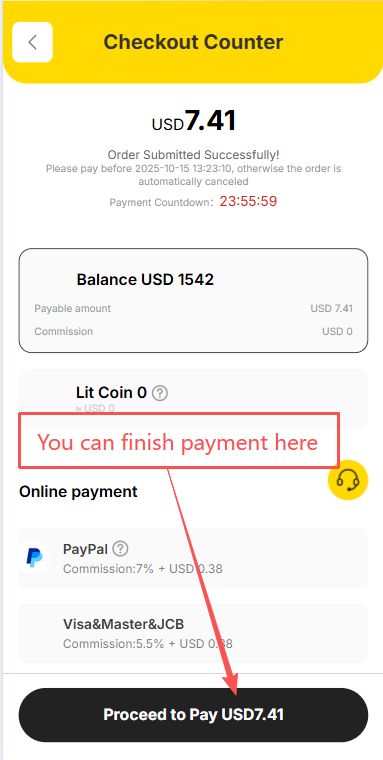
Select the correct variant and quantity, enter instructions, review the destination and pay for the goods and domestic shipping. The screenshot sequence shows variant selection, confirmation and checkout; these screens are offset from some headings in the official article.
4. Follow the seller order
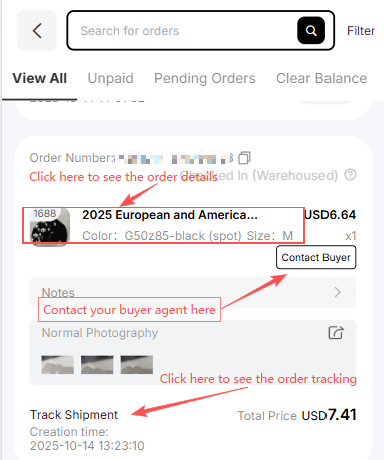
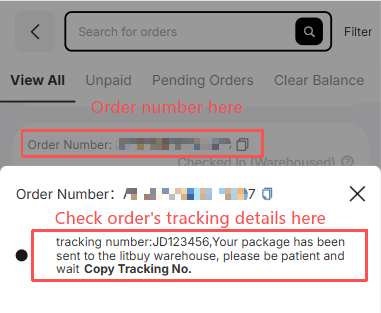
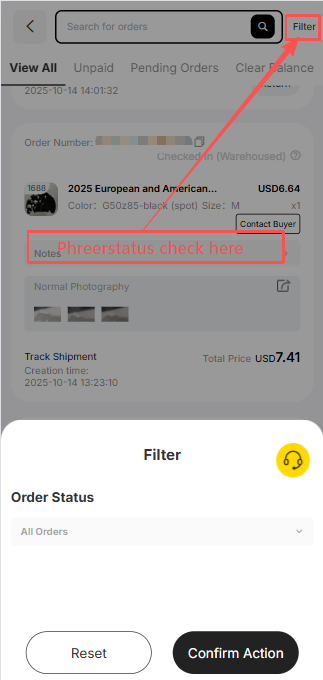
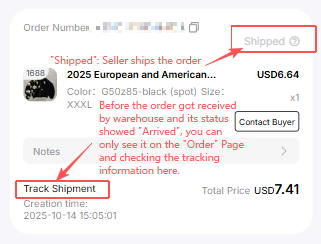
Use Orders to contact the buyer, inspect tracking and filter status. Seller shipment goes to the Chinese warehouse first. Arrival at the delivery point is not yet completed inspection or storage.
5. Inspect stored goods
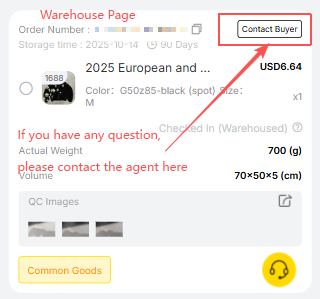
The Warehouse screen shows measurements, QC photos and the buyer contact. Check the actual variant and visible condition promptly, while a seller-agreed return may still be possible.
6. Create and pay for a parcel
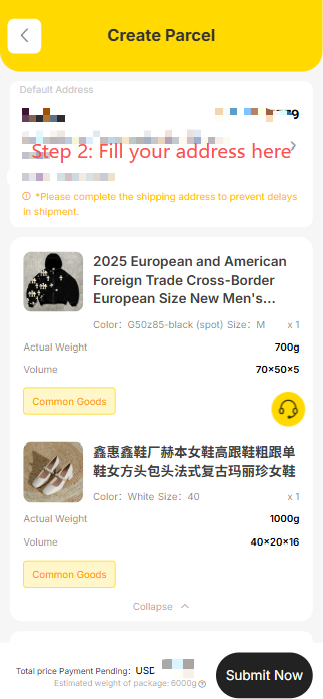
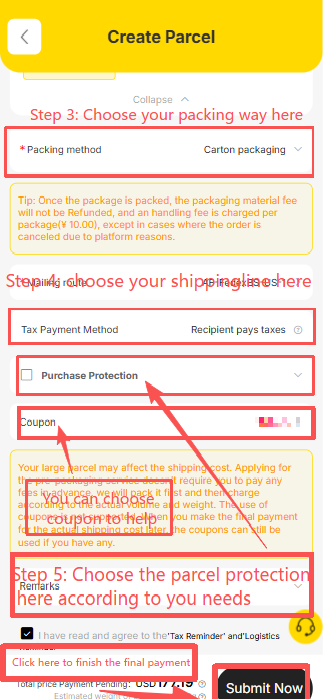
Select stored goods, enter the recipient, choose packing and an eligible route, then check any coupon conditions and pay the shipping estimate. Confirm restrictions for the complete parcel.
7. Follow international shipping
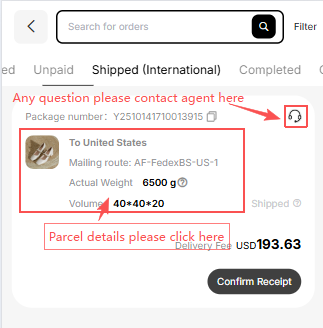
The Parcel page records the dispatched parcel and support contact. Final packed weight and dimensions may change the shipping settlement; pictured prices and routes are examples.
8. Confirm actual receipt
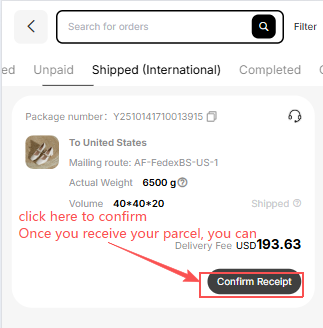
Inspect the parcel and keep evidence before confirming actual delivery. Report a problem through the relevant carrier and LitBuy procedure promptly.
Official How to Use LitBuy article. Its nine status milestones are Order Submitted → Order Placed → Seller Shipped → Arrived at Warehouse → Inspection & Storage → Shipping Requested → Parcel Packed → Shipped → Delivered & Confirmed. Processing times in its summary and detailed text differ; follow the status of your own order.